Your app’s user interface is everything that the user can see and interact with. Android provides a variety of pre-built UI components such as structured layout objects and UI controls that allow you to build the graphical user interface for your app. Android also provides other UI modules for special interfaces such as dialogs, notifications, and menus. What are some best practices associated with setting and declaring the properties of an Android user interface?
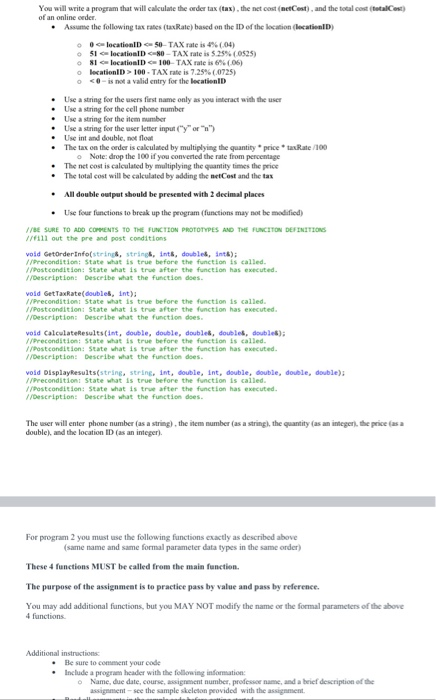
You will write a program that will calculate the order tax (tax) , the net cost (netCost) , and the total cost (totalCost)
of an online order.
• Assume the following tax rates (taxRate) based on the ID of the location (locationID)
o 0 <= locationID <= 50– TAX rate is 4% (.04)
o 51 <= locationID <=80 – TAX rate is 5.25% (.0525)
o 81 <= locationID <= 100– TAX rate is 6% (.06)
o locationID > 100 – TAX rate is 7.25% (.0725)
o < 0 – is not a valid entry for the locationID
• Use a string for the users first name only as you interact with the user
• Use a string for the cell phone number
• Use a string for the item number
• Use a string for the user letter input (“y” or “n”)
• Use int and double, not float
• The tax on the order is calculated by multiplying the quantity * price * taxRate /100
o Note: drop the 100 if you converted the rate from percentage
• The net cost is calculated by multiplying the quantity times the price
• The total cost will be calculated by adding the netCost and the tax
• All double output should be presented with 2 decimal places
• Use four functions to break up the program (functions may not be modified)
//BE SURE TO ADD COMMENTS TO THE FUNCTION PROTOTYPES AND THE FUNCITON DEFINITIONS
//fill out the pre and post conditions
void GetOrderInfo(string&, string&, int&, double&, int&);
//Precondition: State what is true before the function is called.
//Postcondition: State what is true after the function has executed.
//Description: Describe what the function does.
void GetTaxRate(double&, int);
//Precondition: State what is true before the function is called.
//Postcondition: State what is true after the function has executed.
//Description: Describe what the function does.
void CalculateResults(int, double, double, double&, double&, double&);
//Precondition: State what is true before the function is called.
//Postcondition: State what is true after the function has executed.
//Description: Describe what the function does.
void DisplayResults(string, string, int, double, int, double, double, double, double);
//Precondition: State what is true before the function is called.
//Postcondition: State what is true after the function has executed.
//Description: Describe what the function does.
The user will enter phone number (as a string) , the item number (as a string), the quantity (as an integer), the price (as a
double), and the location ID (as an integer) For program 2 you must use the following functions exactly as described above
(same name and same formal parameter data types in the same order)
These 4 functions MUST be called from the main function.
The purpose of the assignment is to practice pass by value and pass by reference.
You may add additional functions, but you MAY NOT modify the name or the formal parameters of the above
4 functions.
Additional instructions:
• Be sure to comment your code
• Include a program header with the following information:
o Name, due date, course, assignment number, professor name, and a brief description of the
assignment – see the sample skeleton provided with the assignment.
• Read all comments in the sample code before getting started
• Read the problem and determine what to do
• Write the algorithm (you DO NOT need to submit the algorithm)
• Implement one component at a time in your code and do not move onto the next component until you
are sure it is correct.
• Test your program before submitting
• One source code file (unformatted text) will be submitted
• The file name must match the assignment
• The code should be tested and run on a Microsoft compiler before it is uploaded onto Canvas
• The code must be submitted on time in order to receive credit (11:59 PM on the due date)
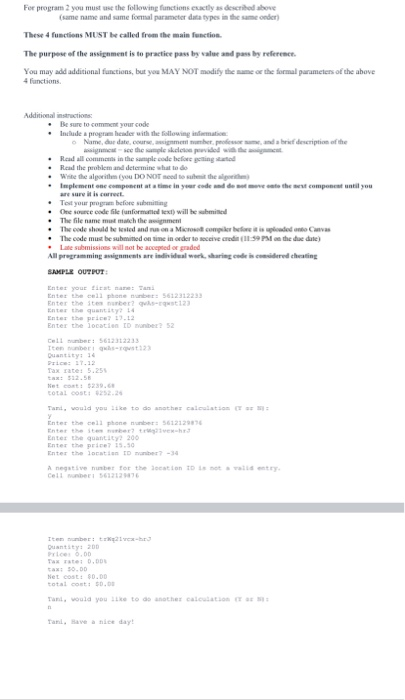
SAMPLE OUTPUT:
Enter your first name: Tami
Enter the cell phone number: 5612312233
Enter the item number? qwAs-rqwst123
Enter the quantity? 14
Enter the price? 17.12
Enter the location ID number? 52
Cell number: 5612312233
Item number: qwAs-rqwst123
Quantity: 14
Price: 17.12
Tax rate: 5.25%
tax: $12.58
Net cost: $239.68
total cost: $252.26
Tami, would you like to do another calculation (Y or N):
y
Enter the cell phone number: 5612129876
Enter the item number? trWq21vcx-hrJ
Enter the quantity? 200
Enter the price? 15.50
Enter the location ID number? -34
A negative number for the location ID is not a valid entry.
Cell number: 5612129876
Item number: trWq21vcx-hrJ
Quantity: 200
Price: 0.00
Tax rate: 0.00%
tax: $0.00
Net cost: $0.00
total cost: $0.00
Tami, would you like to do another calculation (Y or N):
n
Tami, Have a nice day!


for c++
FILE AND PRINT SHARING
On the Windows server, configure each folder created in the File and Folder Permissions Lab to be accessible as a network resource share.
Set the share permissions as “Everyone | Full Control.
Create another Windows workstation within the virtual environment. Ensure that it is operating on the same IP subnet as the Windows Server (domain controller) and has a new computer name. Join this system to your existing Windows domain.
Using the workstation, create drive maps to each shared folder on the Windows Server.
As you go, take instructional notes and screenshots that will help to reproduce your process. Submit these notes as proof of completion.
APA style is not required, but solid academic writing is expected.
Refer to “ITT-121 File and Print Sharing Scoring Guide,” prior to beginning the assignment to become familiar with the expectations for successful completion.
You are not required to submit this assignment to LopesWrite.
infosec leadership and communication
Discuss the pros and cons of technical ability as a manager in two paragraphs. In your first paragraph, discuss one reason why technical ability is crucial to an Information Security manager’s job. In your second paragraph, discuss one reason why technical ability is a potential problem for an Information Security manager’s job.
500 words. I am not looking for a deep research project, just your thoughts on the topic. Do not use the APA format for this discussion post , except for citations and references. This must be your own work. I will look for plagiarism.
Discussion 250 -300 words
Do some Internet research on flow control in data communications networks. Identify common examples of why flow control is needed and how it is used to ensure reliable data transfer between senders and receivers. Provide references.
Java
/*
* Click nbfs://nbhost/SystemFileSystem/Templates/Licenses/license-default.txt to change this license
* Click nbfs://nbhost/SystemFileSystem/Templates/Classes/Class.java to edit this template
*/
package poker;
import java.util.ArrayList;
/**
*
* @author adamt
*/
public class Player {
private int money;
private int wager;
private Hand hand;
public Player(){
money=1000;
wager=0;
hand=new Hand();
}
public Hand getHand(){
return hand;
}
public void setWager(int i){
wager=i;
}
public int getWager(){
return wager;
}
public int moneyGained(int i){
money+=i;
return money;
}
public int moneyLost(int i){
money-=i;
return money;
}
public int getMoney(){
return money;
}
Exp19_Excel_Ch05_Cap_Apartments
#Exp19_Excel_Ch05_Cap_Apartments
Project Description:
You manage several apartment complexes in Phoenix, Arizona. You created a dataset that lists details for each apartment complex, such as apartment number, including number of bedrooms, whether the unit is rented or vacant, the last remodel date, rent, and deposits. You will use the datasets to aggregate data to analyze the apartments at the complexes.
Start Excel. Download and open the file named Exp19_Excel_Ch05_Cap_Apartments.xlsx. Grader has automatically added your last name to the beginning of the filename.
Before subtotalling the data, you need to sort the data.
Select the Summary sheet. Sort the data by Apartment Complex in alphabetical order and further sort it by # Bed (the number of bedrooms) from smallest to largest.
You want to use the Subtotal feature to display the average total deposit by number of bedrooms for each apartment complex.
Use the Subtotal feature to insert subtotal rows by Apartment Complex to calculate the average Total Deposit. Add a second subtotal (without removing the first subtotal) by # Bed to calculate the average Total Deposit by the number of bedrooms.
Use the outline symbols to display only the subtotal rows. Create an automatic outline and collapse the outline above Total Deposit.
You want to create a PivotTable to determine the total monthly rental revenue for occupied apartments.
Display the Rentals sheet and create a blank PivotTable on a new worksheet to the left of the Rentals sheet. Change the name of the worksheet to Rental Revenue. Name the PivotTable Rental Revenue.
Display the Apartment Complex and # Bed fields in Rows and the Rental Price field as Values.
Format the Sum of Rental Price for Accounting Number Format with zero decimal places and enter the custom name Total Rent Collected.
Select the Occupied field for the filter and set the filter to Yes to display data for occupied apartments.
You want to calculate the total monthly rental revenue if the rates increase by 5% for the occupied apartments.
Insert a calculated field to multiply the Rental Price by 1.05. Change the name to New Rental Revenue. Apply Accounting Number Format with zero decimal places.
Select the range B3:C3 and apply these formats: wrap text, Align Right horizontal alignment, and 30 row height. Select column B and set 9.29 column width. Select column C and set 14.43 column width.
Apply Light Orange, Pivot Style Medium 10 to the PivotTable and display banded rows.
Insert a slicer for # Bed so that you can filter the dataset by number of bedrooms. Change the slicer caption to # of Bedrooms.
Change the slicer height to 1.4 inches and width to 1.75 inches. Apply Light Orange, Slicer Style Light 2. Cut the slicer and paste it in cell E2.
Insert a timeline for the Last Remodel field. Change the time period to YEARS. Apply Light Orange, Timeline Style Light 2. Change the timeline height to 1.4 inches and with to 3.75 inches.
The Databases sheet contains two tables. You will create a relationship between those tables.
Display the Databases sheet. Create a relationship between the APARTMENTS table using the Code field and the COMPLEX table using the Code field.
You want to create a PivotTable from the related tables.
Create a PivotTable using the data model on a new sheet. Change the sheet name to Bedrooms. Name the PivotTable BedroomData.
Select the Apartment Name field from the COMPLEX table for Rows, the # Bed field for Columns, and the # Bed field as Values. This will display the number of apartments with the specified number of bedrooms per apartment complex. Display the values as a percentage of row totals.
Create a Clustered Column PivotChart. Cut the chart and paste it in cell A13 using the Destination Theme.
Select the 3-bedroom data series and apply the Black, Text 1, Lighter 50% solid fill color. Apply Black, Text 1 font color to the vertical axis and category axis. Change the chart height to 3 inches and the width to 5 inches, if necessary. Hide the field buttons in the PivotChart.
Create a footer on all worksheets with your name in the left, the sheet name code in the center, and the file name code in the right.
Save and close Exp19_Excel_Ch05_Cap_Apartments.xlsx. Exit Excel. Submit the file as directed.

computer project
The project is on CYBER SECURITY
need plagr rpt
8-1 Discussion: Freedom of Speech Online
After reading about the idea of freedom of online speech, discuss the following: Should internet content be censored? Explain using examples. Should an internet provider be liable for the content that appears online? Why or why not? Use recent, relevant examples from the news to support your position.
Mobile App Development for iOS and Android Project Paper
Identify and explain a specific business process. How might this process be automated with mobile technologies? How might it be completely redesigned? Refer to the instructions in the textbook.
https://www.vitalsource.com/products/mobile-app-development-for-ios-and-android-jakob-iversen-amp-michael-v9781943153909